Edit: missed Raist's post so it's already been answered.
Shiva.Msthief said:
... game screen freezing up ... flipping through my logs really fast ... running at least two instances...
Running multiple instance = XI randomly freezes when you expand the log window/flip through /s,/t,/p etc. It's always been this way. Consider the logger Windower plugin and Notepad++ as an alternative if you really need to review your chat window regularly while dual boxing.
A couple questions after reading everything, I'm currently @ 1920x1080 but when I go into the Launcher GUI it wont let me select 3840x2160 :x Also drawdistance 25.0 isn't doing anything for me
http://i37.photobucket.com/albums/e62/R3nO11/ffxi_20110705_115744.png I just built a new PC and it seems like my game should look better than this: ; ;
http://i37.photobucket.com/albums/e62/R3nO11/ffxi_20110705_115744.png I just built a new PC and it seems like my game should look better than this: ; ;
Looks pretty good to me. The only "ugly" thing in the picture is the ground you're standing on, but that's just a bad texture on SE's part.
Downloaded Darkshade's user interface for the updated graphics, resized my background and such and ended up with this..
* now mind you I play on a laptop hooked into my TV so I maximize my game to the "fullscreen" and all the font is compeltely stretched out and ridiculous to read.
Overlay resolution should typically be the size of your screen... it's the size of the "box" you play FFXI in.
Common ones for a HDTV are 1280 x 720 and 1920 x 1080 (depends on your TV really)...
If you take an overlay resolution of 1024x1024, it's basically going to take what FFXI should look like and crush it into a square box. If you don't want to play full screen, something like 1024 x 768 or 800x600 should work...
When you take a 1024x1024 image and make it full screen, it's basically just stretching the image to fit, which distorts the picture. If you ever took some Silly Putty to a comic strip as a kid and stretched it out, that analogy kind of works...
Overlay resolution should typically be the size of your screen... it's the size of the "box" you play FFXI in.
Common ones for a HDTV are 1280 x 720 and 1920 x 1080 (depends on your TV really)...
If you take an overlay resolution of 1024x1024, it's basically going to take what FFXI should look like and crush it into a square box. If you don't want to play full screen, something like 1024 x 768 or 800x600 should work...
When you take a 1024x1024 image and make it full screen, it's basically just stretching the image to fit, which distorts the picture. If you ever took some Silly Putty to a comic strip as a kid and stretched it out, that analogy kind of works...
Thank you I will try that now- I didn't want the super tiny font (bad eyesight) :P
Downloaded Darkshade's user interface for the updated graphics, resized my background and such and ended up with this..
* now mind you I play on a laptop hooked into my TV so I maximize my game to the "fullscreen" and all the font is compeltely stretched out and ridiculous to read.
1. you have 1024x1024, not too sure if this is a problem but normally i see 4:3 ratios, not 1:1, try 1024x768 maybe (not sure if this is a problem tho)
2. your background resolution doesnt line up at all with your resolution. should be the same or double your resolution, either 1024x1024 or 2048x2048 with your current resolution or 1024x768 or 2048x1536 with the resolution i said earlier
1. you have 1024x1024, not too sure if this is a problem but normally i see 4:3 ratios, not 1:1, try 1024x768 maybe (not sure if this is a problem tho)
2. your background resolution doesnt line up at all with your resolution. should be the same or double your resolution, either 1024x1024 or 2048x2048 with your current resolution or 1024x768 or 2048x1536 with the resolution i said earlier
I did exactly what you said and it worked 100% I have the bigger font but its not squished <3 ty!
I use drawdistance 2.5 usually. I appreciate some of that "fog" look and not having all landscape rendered with the exact same color as stuff right next to me.
Can someone explain to me why my graphics have that jagged-ness on some portions of text/graphics. I've mentioned this in previous help me threads with no real answer. I have a 1680 by 1050 resolution and doubling the background doesn't exactly make it go away. More info on my issue from here:
I have a feeling it has something to do with Windows 7 as the top window bar still shows on windower mode as oppose to Win XP where I can move it and hide it. I feel Win 7 resizes the window beyond what it should be.
Can someone explain to me why my graphics have that jagged-ness on some portions of text/graphics. I've mentioned this in previous help me threads with no real answer. I have a 1680 by 1050 resolution and doubling the background doesn't exactly make it go away. More info on my issue from here:
I have a feeling it has something to do with Windows 7 as the top window bar still shows on windower mode as oppose to Win XP where I can move it and hide it. I feel Win 7 resizes the window beyond what it should be.
you tried using 4:3 instead of widescreen proportions? i've never had a good experience with widescreen
other than that only thing i can think of is posting some screenshots
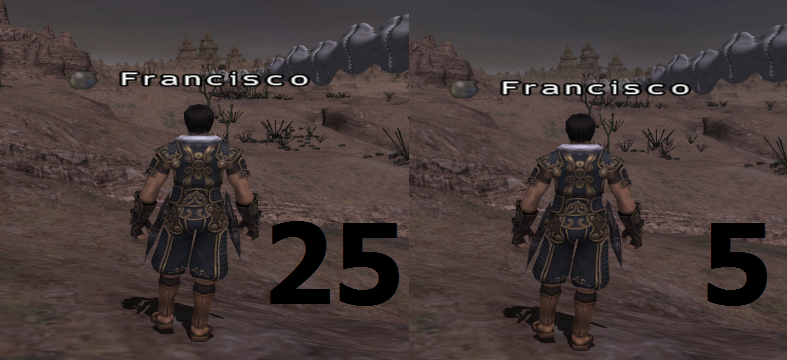
Sometimes certain terrain objects don't render fully until your really close to them - for example, fauna in Meriphataud Mountains. This gives the odd appearance of plants "lighting up" as you get closer to them. At first I thought it was an issue with ambient lighting, but it seems to be more a texture/detail thing.
I have Mip Mapping set to 6, which I thought would prevent that...
I play with windower, windowed, then extended to fit the screen at my monitor's resolution. The problem is, since it has a bar up top, as well as my start bar below, the resolution isn't exactly as it should be, which causes the text to distort ever so slightly. Is there an easy (and precise) way to calculate my actual game window size to make the text not distort, or should I just play fullscreen/play in a smaller window and not extend it?
I prefer having the game take up the screen with the start bar easily accessible at the bottom if I need to pull up the intarwebs or something. Just a habit *shrug*.
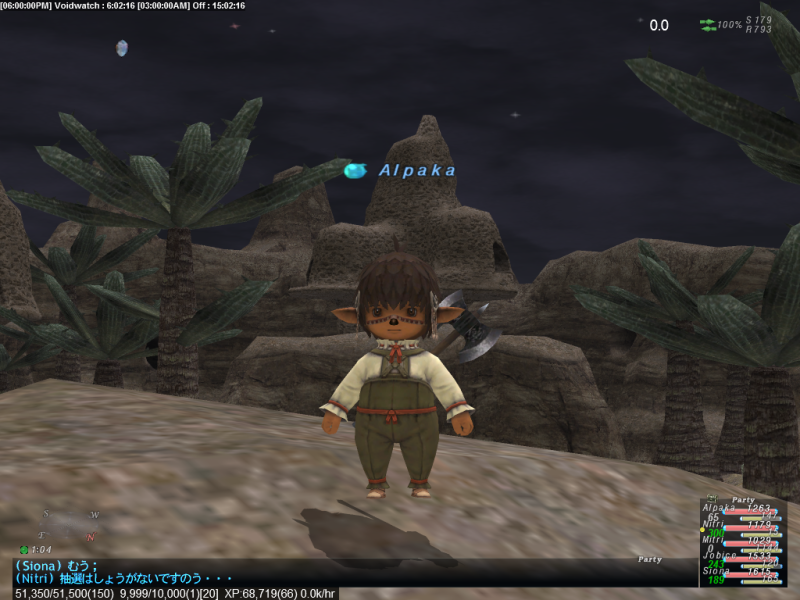
Notice in the screenshot that mainly the letter M and I's seem very jagged. I've become so used to the look that I no longer notice them on my items so I didn't screenshot those.
To answer the other question, I don't plan on playing this game @ 4:3 ratio on a widescreen monitor =0
I play with windower, windowed, then extended to fit the screen at my monitor's resolution. The problem is, since it has a bar up top, as well as my start bar below, the resolution isn't exactly as it should be, which causes the text to distort ever so slightly. Is there an easy (and precise) way to calculate my actual game window size to make the text not distort, or should I just play fullscreen/play in a smaller window and not extend it?
I prefer having the game take up the screen with the start bar easily accessible at the bottom if I need to pull up the intarwebs or something. Just a habit *shrug*.
best way i can think of to measure that would be to take a screenshot and open it in photoshop and measure it, but even then it may not be 100% accurate. and on top of that, not sure if that would work either because changing the resolution like that would mess up the resolution ratio, but its worth a shot if you wanted to try it i suppose. as for full screen or smaller window that is personal preference, me liking to play in a smaller window
I play with windower, windowed, then extended to fit the screen at my monitor's resolution. The problem is, since it has a bar up top, as well as my start bar below, the resolution isn't exactly as it should be, which causes the text to distort ever so slightly. Is there an easy (and precise) way to calculate my actual game window size to make the text not distort, or should I just play fullscreen/play in a smaller window and not extend it?
I prefer having the game take up the screen with the start bar easily accessible at the bottom if I need to pull up the intarwebs or something. Just a habit *shrug*.
You are having the exact same issue I have. I'm betting your on Windows 7 as well. You can auto-hide the bottom taskbar but the window bar is my problem as well.
Notice in the screenshot that mainly the letter M and I's seem very jagged. I've become so used to the look that I no longer notice them on my items so I didn't screenshot those.
To answer the other question, I don't plan on playing this game @ 4:3 ratio on a widescreen monitor =0
Looks like it's just being crushed a bit. Playing without the border may fix it... Also, if you are stretching the window by dragging the borders around, that can cause the skewing of text.
Switching Aspect Ratio in game has no effect on text or windows, just actual in game objects (terrain, mobs, players, etc)...








 ; ;
; ;